
Inside a Global CDN: The Mysterious ZooKeeper Wait
On 9 March 2026, one of our large data pipelines powered by ClickHouse suffered a performance degradation lasting over an hour.
This blog post retells what happened in detail, even though the incident had no observable impact on our internal users, customers, or partners outside the company. So why retell it at all? Mainly because this event challenged the responding team in ways that are worth sharing and it left us with a few fundamental lessons in data engineering.
What happened?
At 13:30 UTC, the team was alerted to a rise in the ZooKeeperWait metric. It was a sudden onset. Whoever is familiar with replicated ClickHouse setups will recognize this metric as one that can spell performance issues. For this particular cluster size, our alerting is set to a low watermark of 10 sec and a high watermark of 20 sec. So seeing thousands of secs meant a great deal of ZooKeeper traffic.
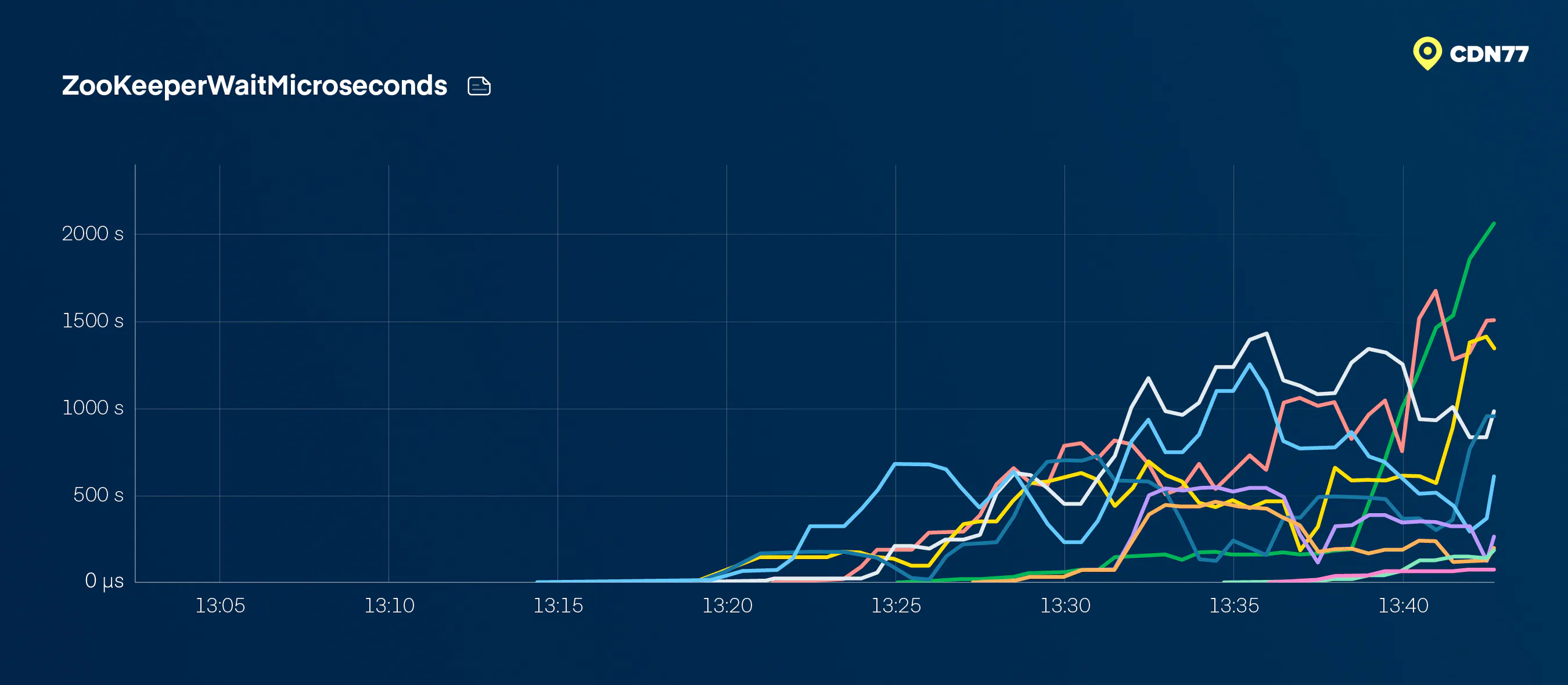
Figure 1: ZooKeeperWait metric rising during the incident
Worryingly enough, the same rise showed up across not just one, but three of our symmetrically redundant instances.
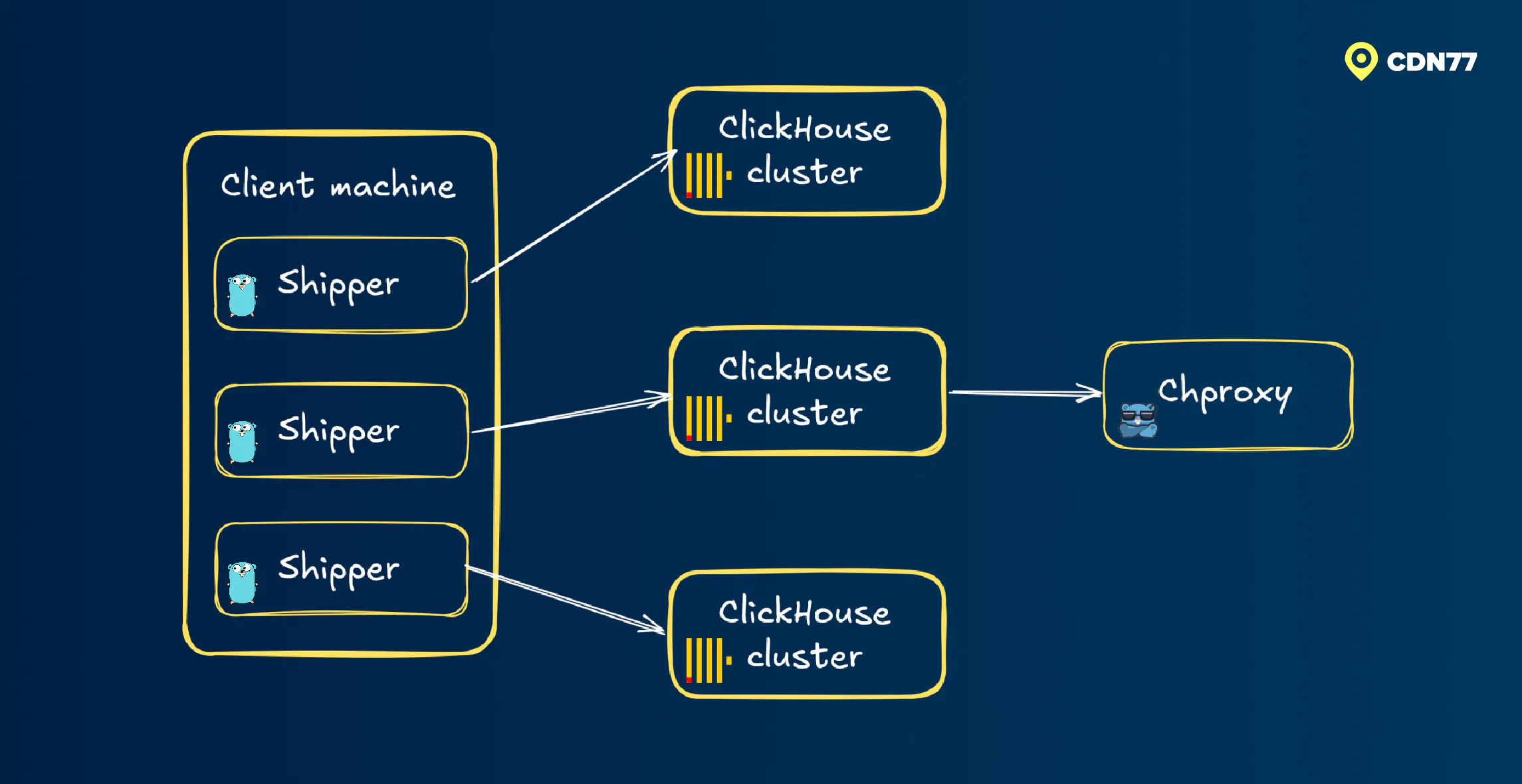
Figure 2: Illustrating ClickHouse instances within a data pipeline
First suspect: a heavy read query
When ZooKeeperWaitMicroseconds climbs, the textbook culprit is a heavy read query stalling writes and piling up coordination load. So that’s where we looked first. Plus, there had been no configuration changes on that day.
It wasn’t so long ago that the best an engineer could do to protect writes from reads in ClickHouse was to use quotas.. Quotas could abort queries. It was a crude instrument; not exactly elegant. Since then, workloads controls have grown a bit. They were originally introduced to control storage load, and last year they extended to CPU scheduling as well. At the time of writing, memory scheduling is next in line.
It was here that we found one suspicious correlation: a daily data-diff job had started almost exactly as ZooKeeperWaitMicroseconds went up.
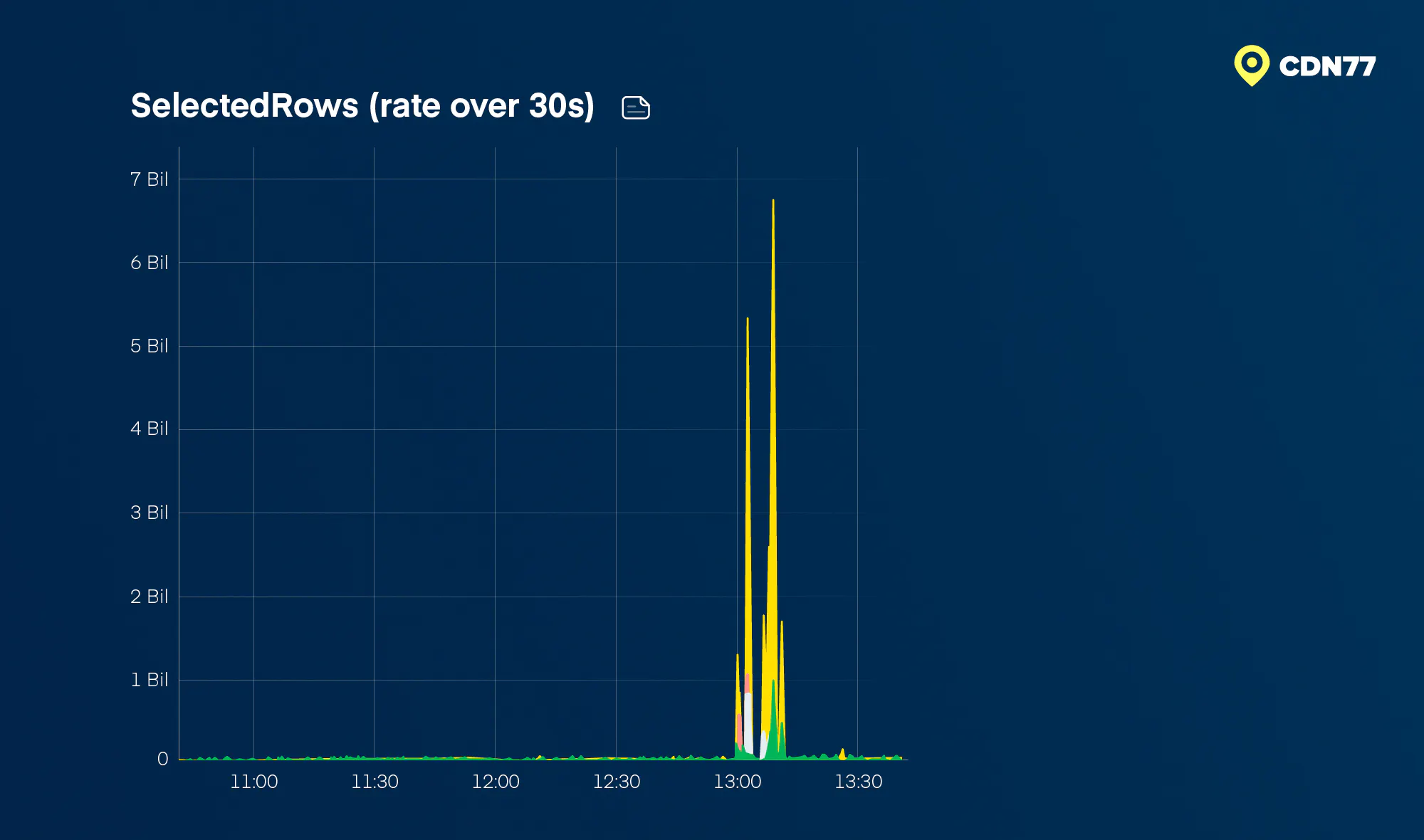
Figure 3: Read load of a daily data diff
Could a routine data diff generate a significant load? Yes. For example, if the primary key cardinality had changed unusually across large aggregations, that could have caused the ZooKeeperWaitMicroseconds to spike up.
By the time we considered the hypothesis, a few minutes had passed. The diff queries were normal and light again. But ZooKeeperWait stayed high. Other health metrics on the affected ClickHouse instances also refused to support the heavy-read theory. CPUs looked normal. RAM looked normal. The number of executing queries looked normal. If heavy reads were the cause, they would have revealed themselves in more ways than this.
Hence, we dismissed heavy reads as the root cause.
The problem with not logging Keeper traffic
At this point, the most useful thing would have been direct introspection into Keeper traffic. ClickHouse makes this possible with system.zookeeper_log. However, this log can grow very large; thus, our configuration disables it, which is also the ClickHouse default. (For the record, version 26.1 introduced a lightweight aggregation, system.aggregated_zookeeper_log.)
Without Keeper traffic logs, we had to infer Keeper pressure from the surrounding evidence. First, we rechecked the instances themselves. They live in different datacenters; one per ClickHouse cluster. An issue affecting all three at once felt extremely unlikely.
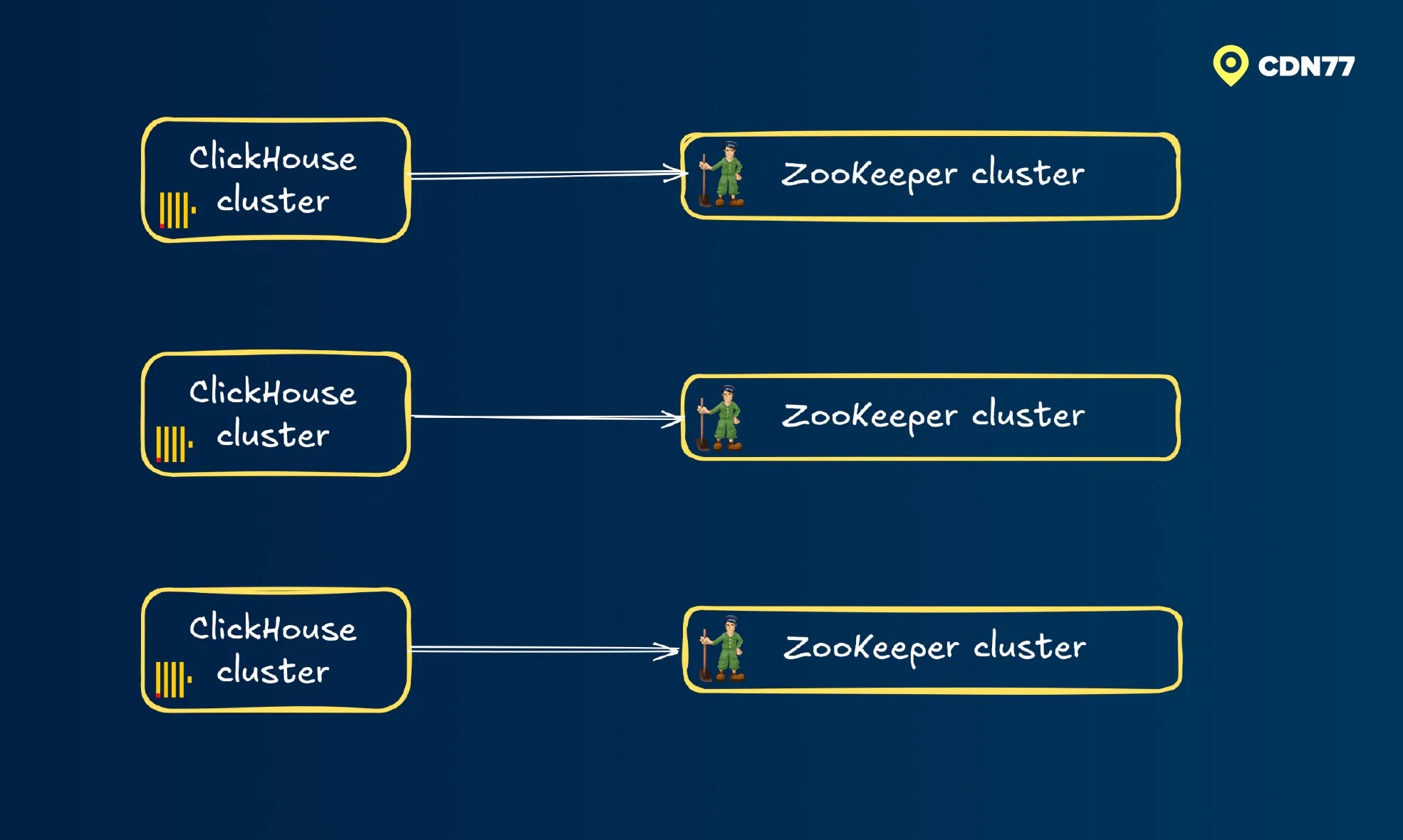
Figure 4: Independent ZooKeeper instances across the affected ClickHouse clusters
Insert sizes were shrinking
Roughly twenty minutes into the incident, one of us took a fresh look at ingest metrics and noticed something odd: the mean insert query size, taken from system.query_log, was decreasing.
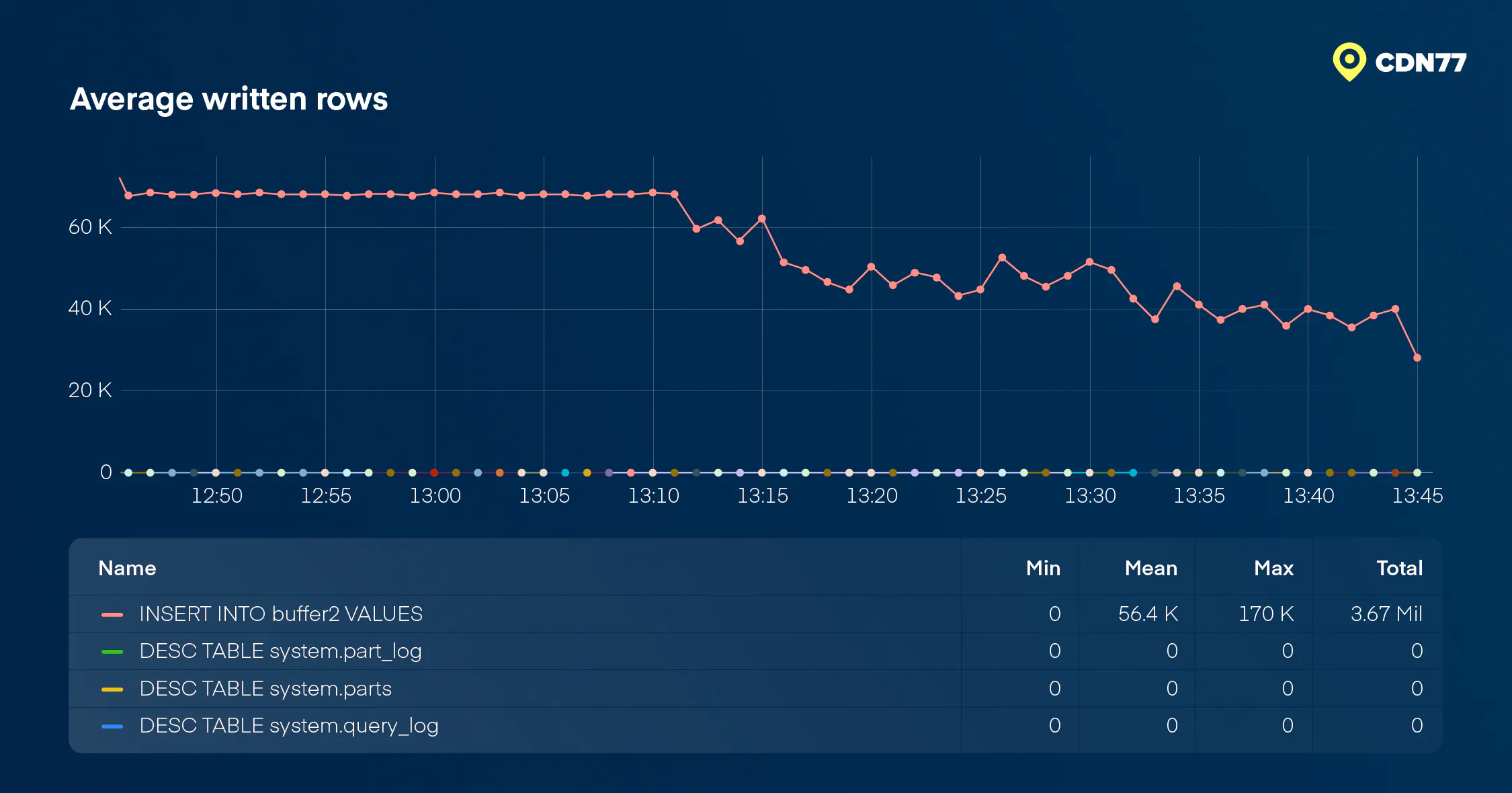
Figure 5: Mean insert query write size decreasing during the incident
Our log shippers appeared to be sending their usual batch sizes: a median of around 70,000 rows per second. ClickHouse, however, was reporting a much lower average in the range of 40,000 rows per second. Admittedly, we did something that engineers sometimes do under incident pressure. We noticed an odd metric, failed to explain it immediately, and mentally put it in the “secondary effect of Keeper load” category.
But, as with all things in retrospect, that “odd” metric was telling us something deeper. At the time, there was no obvious story connecting a decrease in batch size to Keeper load. We couldn’t imagine the load manifesting in the ingest path, but we just didn’t understand the shape of the data yet. Why, you ask? Well, when ClickHouse is overloaded, the expected pattern is for Buffer engine flushes to be slowing down. And they weren’t. (Buffer engine is what we use to batch writes from thousands of client machines, similar in spirit to asynchronous inserts.)
TTL merges... TTL merges everywhere
Shortly after, another piece of the puzzle fell into place. There was a sharp rise in TTL merges during the incident, with merge reason TTLDeleteMerge showing up everywhere in system.part_log.
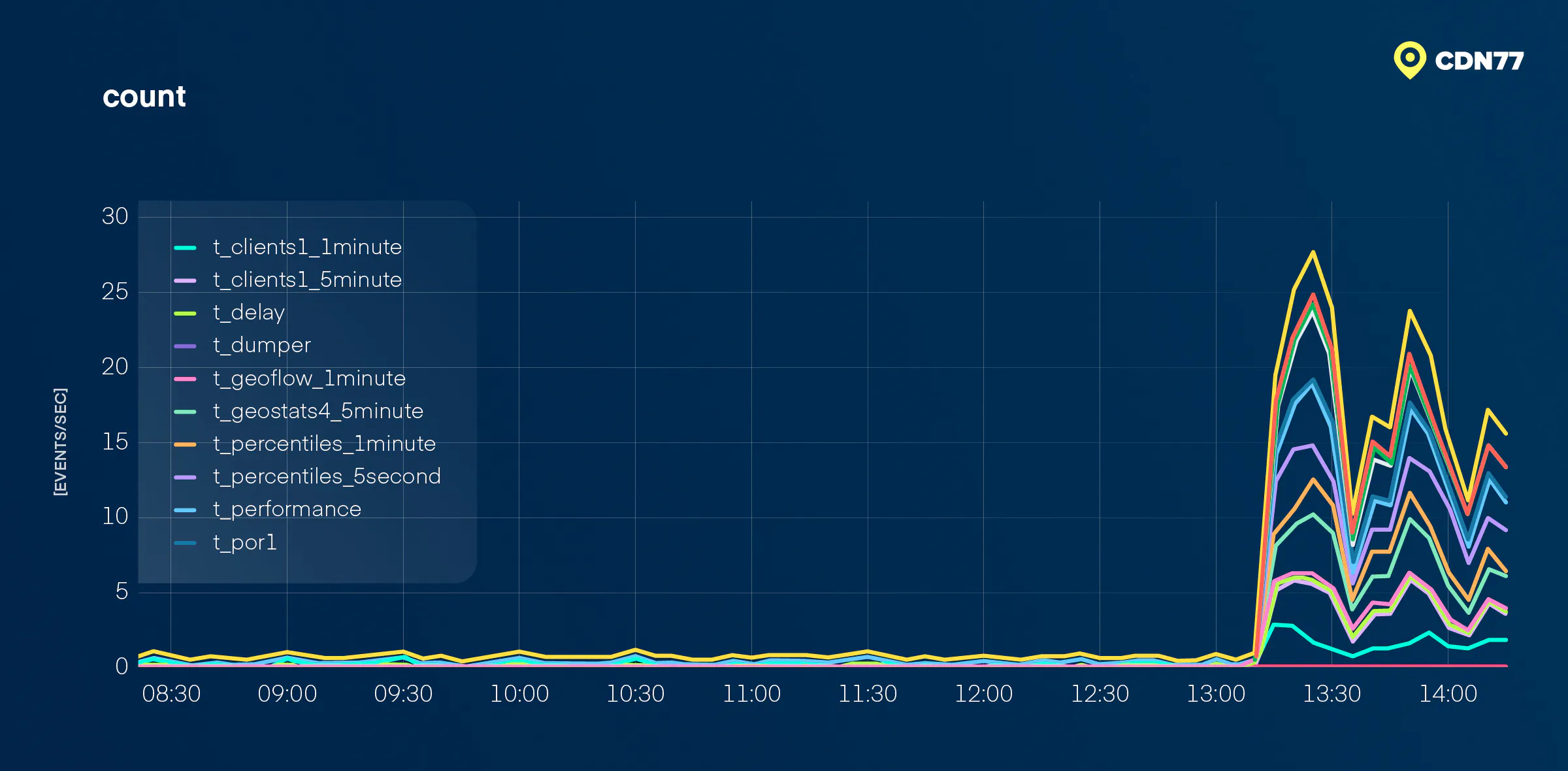
Figure 6: A major rise in TTL merges in the part log (TTLDeleteMerge)
That raised a new question. Why so many merges on a cluster that wasn’t doing much hard work when observed through hard resources? ClickHouse’s error log was repeating "Not executing log entry because 2 merges with TTL already executing." Had ttl_only_drop_parts been disabled somehow? Most of our tables run with this setting enabled. It trades a little disk space for not having to re-merge parts and chew bits off at the end of the retention window. Disabling it suddenly could have produced exactly this pattern.
We checked. It was enabled.
Another dead end.
Breakthrough: arithmetic mean vs. median
At this point, our shipper service was continuously sending the normal batch size… and ClickHouse still reported a decreasing average in the metric. It helped us, in hindsight, that the insert query write size was displayed as a mean rather than a median in the built-in Grafana plugin’s Query dashboard panel. A median would have told us that most inserts still looked normal. The mean told us that something was pulling the query write size down.
Figure 7: Yes, that insert query write size again; just to save you a scroll to Figure 5.
It was here that we started to understand the cause.
Virtually all tables in this database were time series, partitioned by a time unit. Two of our engineers, responding from different locations, arrived at the same hypothesis independently: Starting at 13:15 UTC, some inserts were spanning a very large time range and getting cut up by MergeTree partitioning keys into far too many parts.
What gave it away?
One engineer got there by hunting for a client machine that could explain the gap between normal-looking batch sizes and a falling mean. What they found were two machines sending batches so small and so fast that they nearly halved the average.
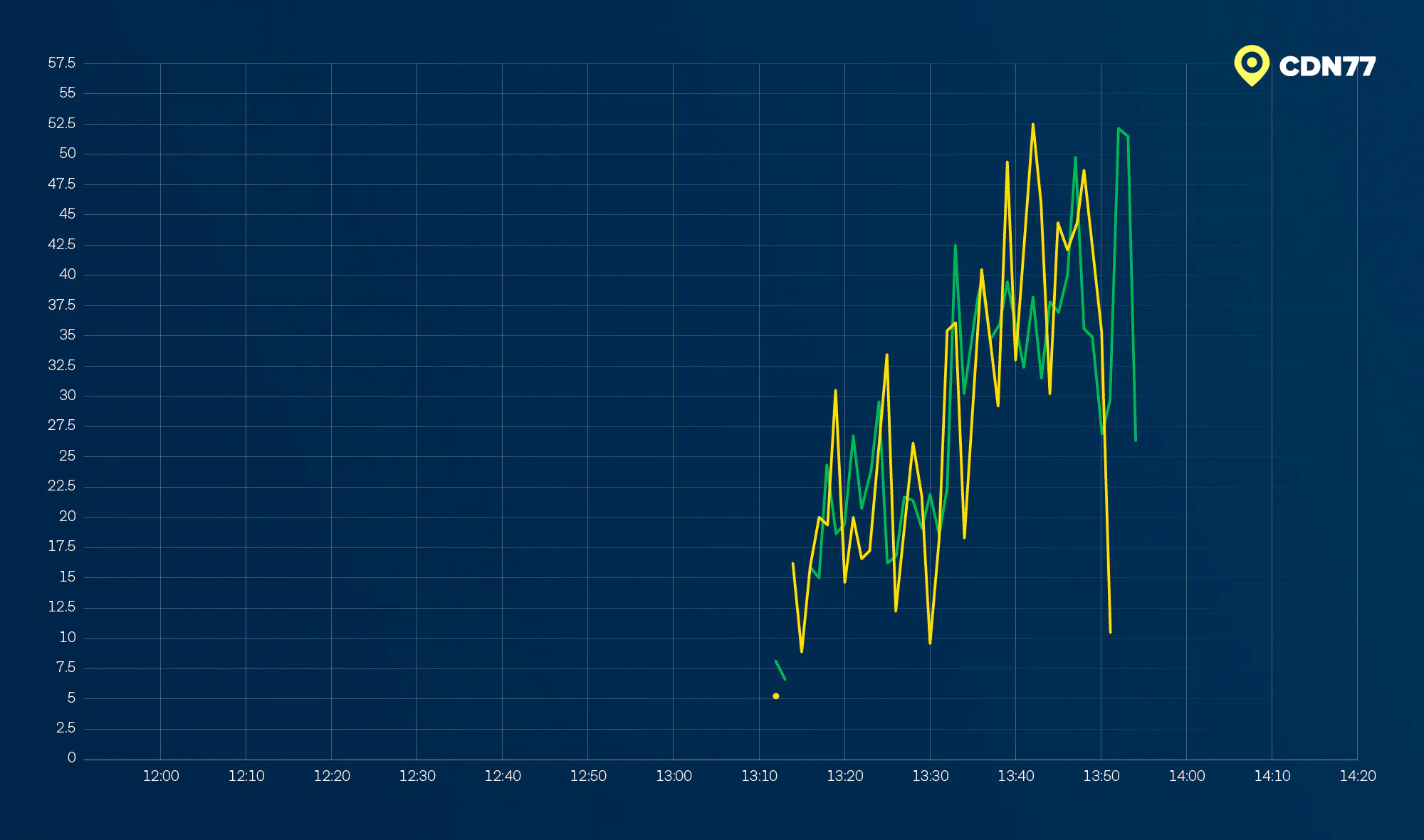
Figure 8: Rows per batches shipped from the two unusually-behaving client machines
Another one of us inspected system.part_log. They saw a sharp increase in the number of created parts – but the total number of rows remained roughly stable. In addition, partition names showed parts being written with timestamps as old as four months.
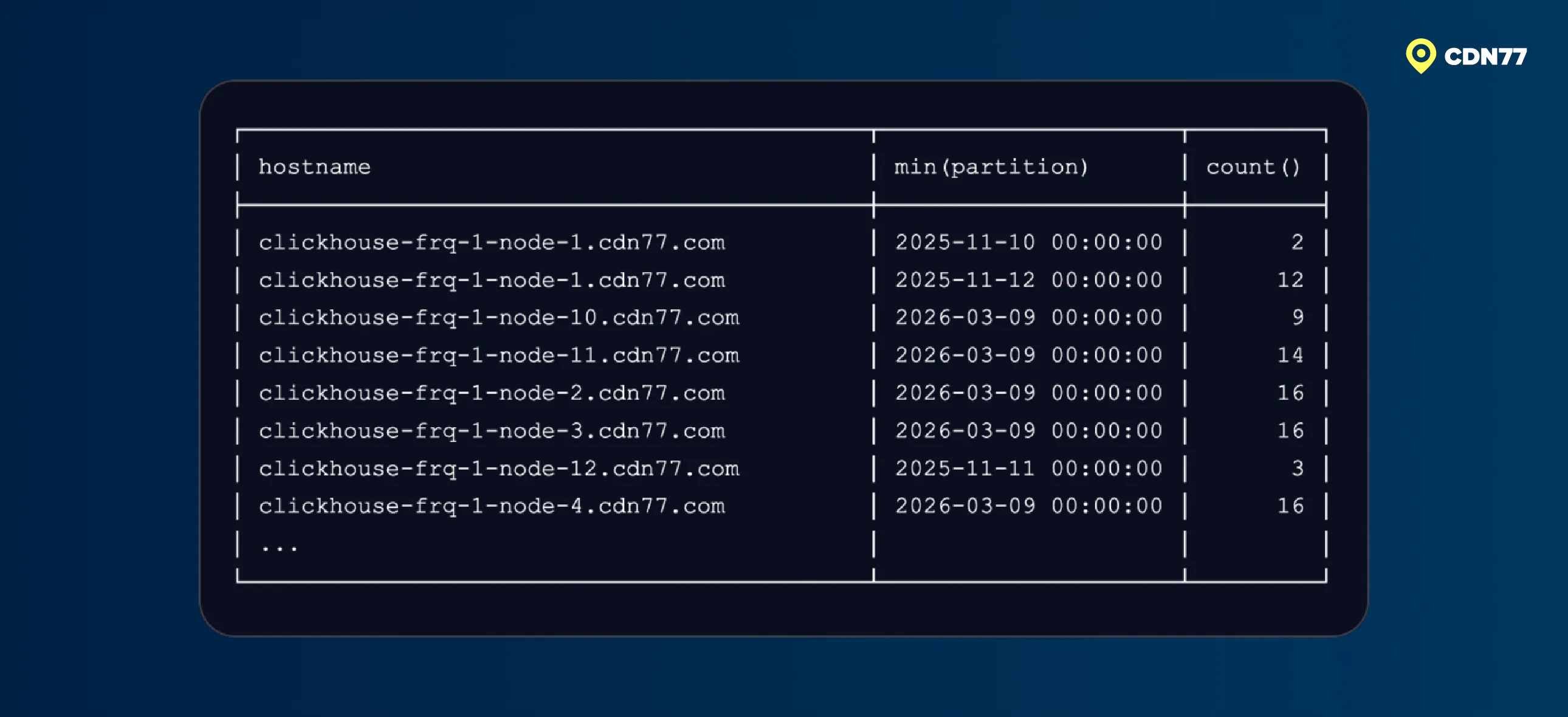
Figure 9: MergeTree table parts and their partitions several months in the past
Consider one table partitioned as finely as by 5 minutes. It holds a couple of days’ worth of our most detailed statistics. For each historical day inserted into that table, the partitioning produces 288 replicated parts. Now multiply that across months.
Accumulating parts is never a good thing in ClickHouse. In our case, parts stuck around because max_number_of_merges_with_ttl_in_pool (defaulting to 2) prevented quick clearance. The thought behind that default is to avoid starving regular merges. This can be increased in proportion to the total number of available merging tasks, background_pool_size.
Why the Buffer table didn’t save us
A reasonable question is: why did small batches not simply concatenate in the Buffer table?
Well, they did. They concatenated normally.
But after merging with all the other client traffic, the resulting flushed dataset spanned a long timeline. It got split by partitioning, forming something we call a “long tail.” We didn’t get a precise lag measurement. Our delay-monitoring table only recorded data from machines at CDN layer zero, due to a leftover filter. The odd machines causing the issue came from a higher layer.
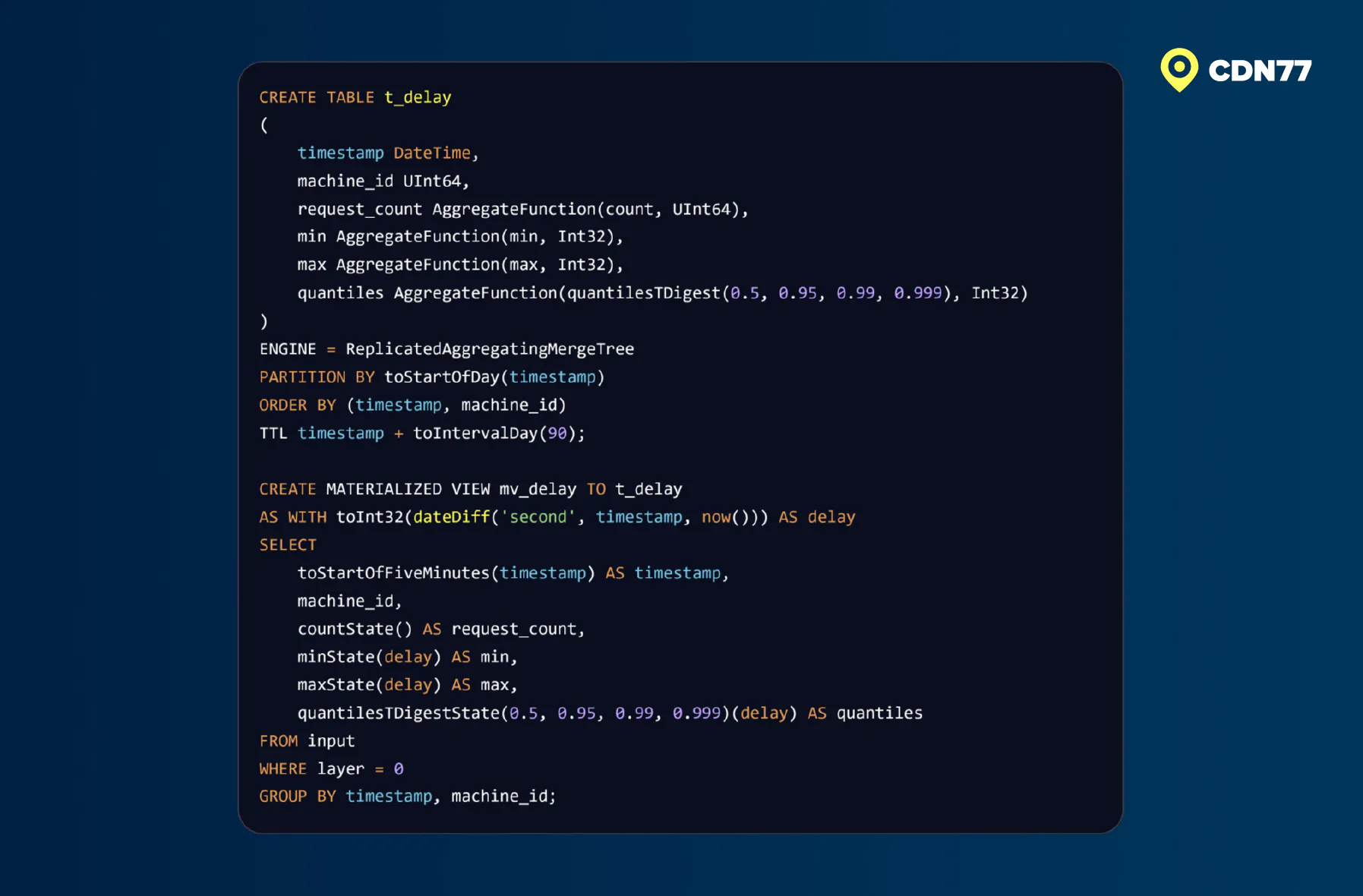
Figure 10: Delivery latency monitoring for CDN layer 0
No “too many parts” error
For the record, we never tripped the classic “too many parts” error (the one that burns your fingers and that teaches everyone to batch generously). Our configured limits were:
- parts_to_delay_insert: 2500
- parts_to_throw_insert: 5000
Those limits weren’t reached, which was just as well. Those limits would have pushed back on the input rate, but input rate wasn’t the problem.
The rise in TTL merges now made sense. Parts were being inserted, replicated, and immediately scheduled for deletion. It made sense why Keeper traffic multiplied and why it slowed down replication, but not ingest. At least not yet.
Root cause: a perfect storm
So: "How did two machines manage to hurt our pipeline this badly?" It’s more complicated than that. The conditions lined up almost perfectly against us:
- The machines had been unplugged from the network with no other maintenance. The shipper processes kept running.
- They had been unplugged for a long time. We’re talking several months.
- The data traffic on them was near zero. So... several months’ worth of data fit in the shipper’s queue and could be sent quickly once the network came back.
- The shipper batches at log time, not send time. That meant the shipper queue filled up with tiny batches without any merging into a larger batch.
- The data being produced was a health check, local to the machine itself. Thus, it kept being produced even with the network down.
- The health check runs on a regular cadence, evenly spanning hours and days; the two most common partitioning keys.
Any one of those conditions alone would have been benign. But together they produced a worst-case input pattern for our specific partitioning scheme.
Takeaways? A lot.
First, throughout this event, the responding team has been reminded how important data structure is.
This particular pipeline is almost exclusively concerned with volume. The majority of our engineering effort goes into supporting its scale. But incoherent timestamps have the potential to destabilize the pipeline just as effectively as cardinality changes do.
Second, “don’t ignore the weird metric”.
We were too quick to gloss over the decrease in query write size. It looked odd early on in the investigation. We saw it. We did not immediately understand it, so we temporarily discounted it. No matter the pressure, one cannot afford to sacrifice attention to detail. It was ultimately this metric’s oddness that led us to the root cause.
Third… sometimes, it is the median you want to see, while other times it is the mean. Both have their place. In our case, it was the mean that played a crucial role in solving the puzzle.
If there is one more lesson, it is about partitioning your data appropriately [1]. Too few partitions get you oversized parts, slow mutations, and TTL that’s either too expensive (with ttl_only_drop_parts off) or doesn’t work at all (with it on). On the other hand, too many partitions make your column scans suffer. Aggregating queries have a lot of final merging to do. Also, the Keeper gets overloaded… as we now know.
Every storm has a silver lining
Let's talk recovery.
Earlier, we mentioned the lack of Keeper logging. What the Keeper log would have told us is that most tables managed to eventually clear their backlog of data parts. We also mentioned a short table partitioned by 5 minutes… that’s the only one that wasn’t cleared. Post-incident, we DROP-CREATE’d it, restoring its normal function. We also broadened its partitioning from minutes to hours. The incident taught us that Keeper operations grow significantly faster than linearly with parts, although we are still establishing the relationship between them.
Aside from a range of observability improvements, the correct way to protect against this type of issue is to sanitize incoming timestamps. That’s why we've implemented out-of-range timestamp rejection in the root MaterializedView tables. A second MV records statistics on what has been rejected.
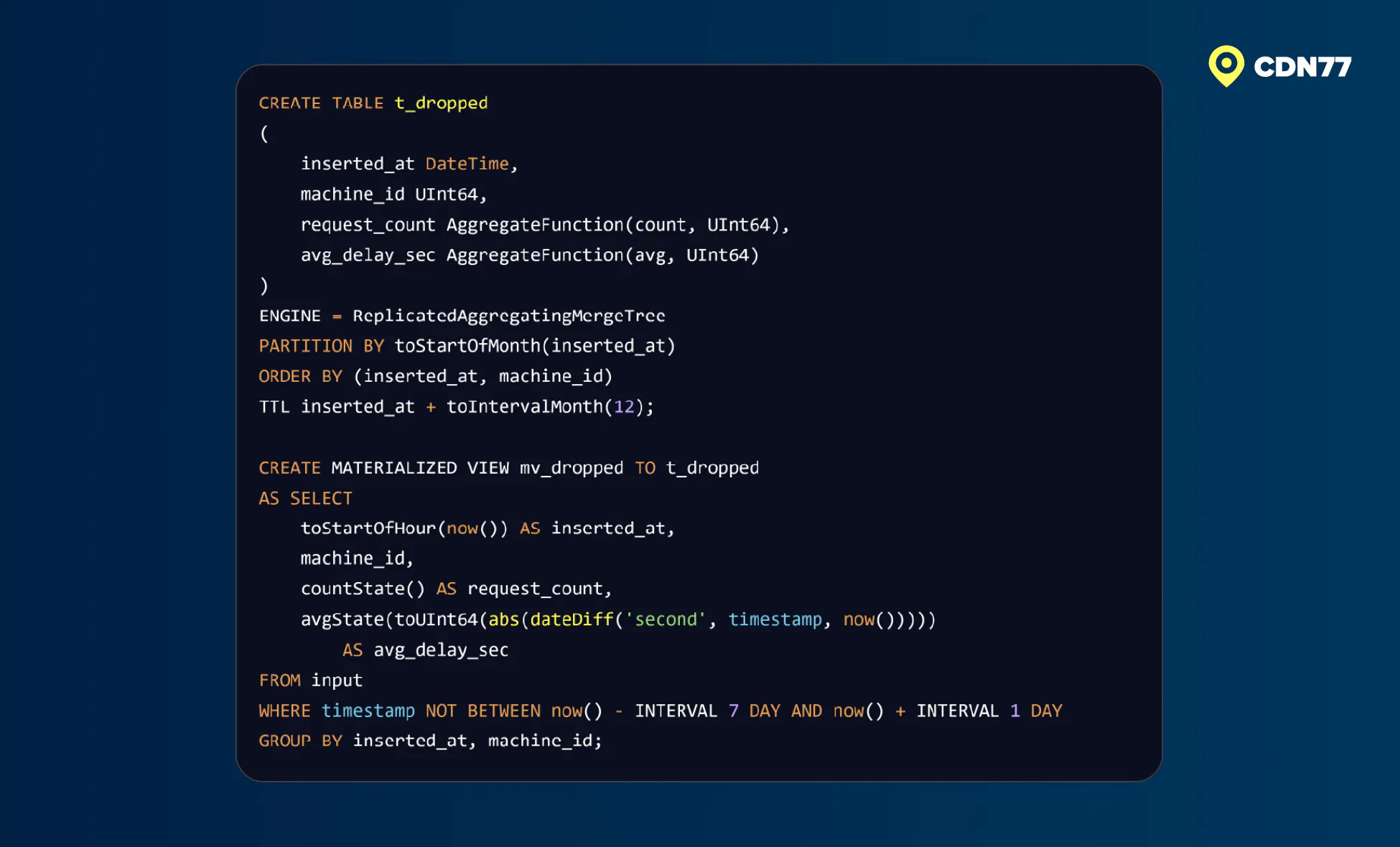
Figure 11: Out-of-range timestamp rejection tracking
Our initial rejection boundaries are deliberately wide enough to leave room for backfilling historical data. We’ll refine them as we collect data on what gets rejected. Filtering by timestamp is a standard practice in data engineering. Prometheus, for example, uses out_of_order_time_window for the same purpose.
We have also built a minimal “perfect storm” test scenario: an insert query whose timestamps span days or months.
We considered turning max_partitions_per_insert_block down, but it can refuse incoming inserts entirely, which means losing data. We prefer to avoid the potential for that.
- For more on the partitioning tradeoff, we recommend Kirill Bobrov’s Slice Smart, Sleep Better. https://luminousmen.com/post/data-partitioning-slice-smart-sleep-better/

Database Engineer